Takeaways
1. What is CAPTCHA and why is it important for websites?
CAPTCHA helps distinguish real users from bots, protecting websites from spam, automated abuse, and malicious attacks.
2. How do I add CAPTCHA to my website?
A typical process includes registering your site with a CAPTCHA provider, integrating the frontend script, verifying results on the backend, and monitoring performance after deployment.
3. Do I always need backend verification for CAPTCHA?
Yes. CAPTCHA results must be verified on the backend to ensure security. Frontend-only checks are not sufficient.
4. Where should CAPTCHA be implemented on a website?
CAPTCHA is commonly used on login, registration, password reset, form submissions, checkout flows, and other high-risk actions.
5. What is the difference between free, subscription-based, and enterprise CAPTCHA solutions?
Free CAPTCHA tools offer basic protection, subscription-based solutions provide stronger detection with limited flexibility, while enterprise CAPTCHA solutions support advanced threats, customization, and dedicated support.
6. Do enterprise CAPTCHA solutions require additional configuration?
Yes. Enterprise CAPTCHA often includes customized security strategies, deployment planning, and ongoing optimization, typically supported by a dedicated technical team.
7. When should a website consider upgrading to an enterprise CAPTCHA solution?
When facing advanced bot attacks, high traffic volume, strict security requirements, or the need for customization and professional support.
Why Websites Need CAPTCHA?
As websites become more critical to business operations, they also become attractive targets for automated abuse.
From credential stuffing and fake account creation to scraping and promotion abuse, bot attacks now affect businesses of all sizes.
CAPTCHA plays a foundational role in:
- Distinguishing human users from automated traffic
- Protecting key business actions
- Reducing security risks without excessive user friction
In modern web security, CAPTCHA is no longer optional—it is a baseline defense mechanism.
What Is CAPTCHA and How It Works?
CAPTCHA (Completely Automated Public Turing test to tell Computers and Humans Apart) is designed to verify whether an interaction is performed by a human.
Rather than relying on static challenges alone, modern CAPTCHA solutions analyze:
- User behavior patterns
- Interaction timing and consistency
- Environmental and device signals
The goal is to block automated abuse while allowing legitimate users to proceed smoothly.
What Is CAPTCHA?
At its core, CAPTCHA is a verification mechanism that introduces friction or behavioral analysis to prevent automated actions.
It is commonly applied to:
- Forms
- Authentication flows
- High-frequency or high-value requests
How CAPTCHA Works?
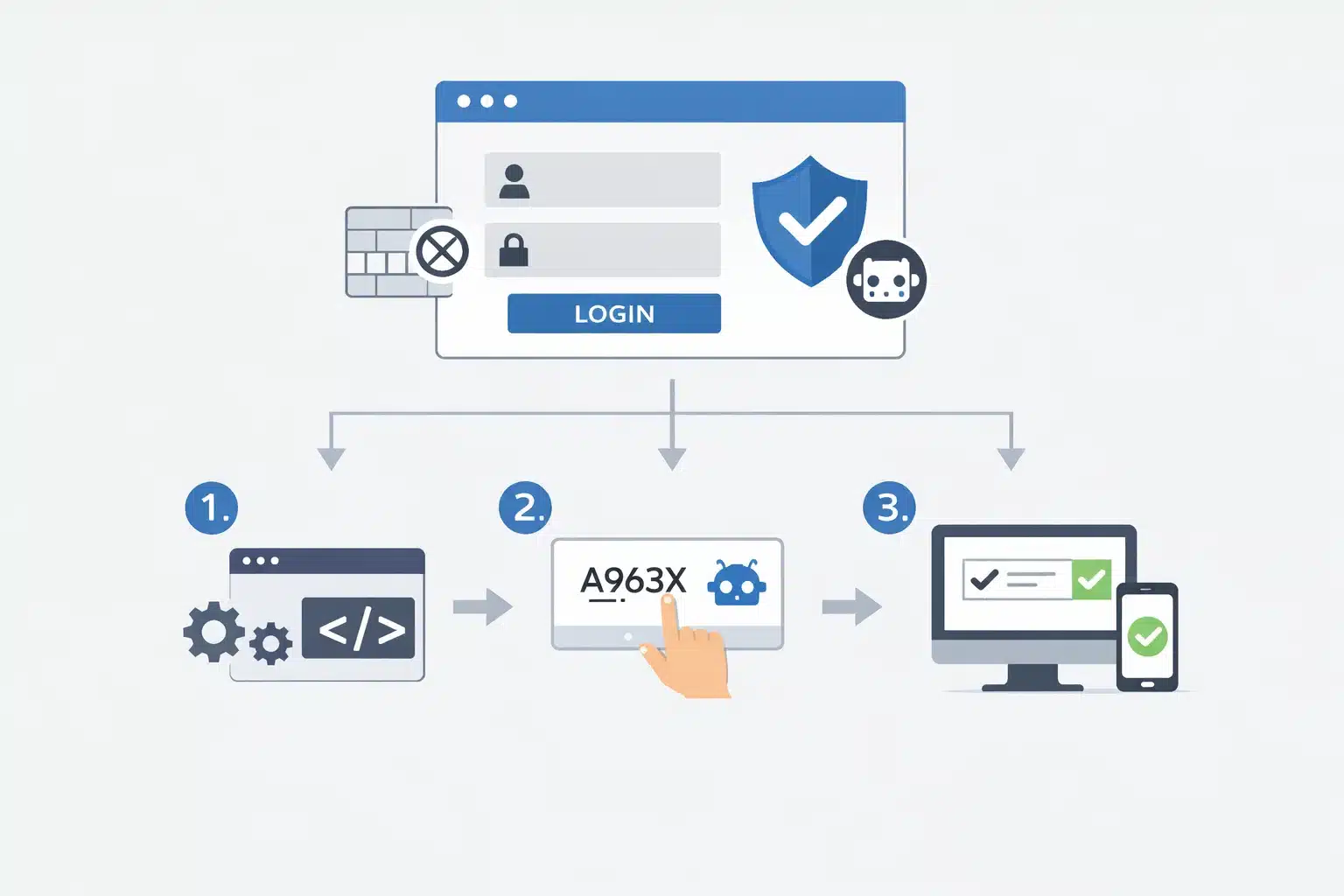
A typical CAPTCHA workflow includes:
- Triggering verification during a sensitive action
- Collecting behavioral or challenge-based signals
- Verifying the result on the backend
- Allowing or blocking the request accordingly
Modern CAPTCHA systems aim to be invisible to legitimate users whenever possible.
Common CAPTCHA Types
Common CAPTCHA types include:
- Text or image-based challenges
- Slider or interaction-based CAPTCHA
- Invisible or risk-based CAPTCHA
- Adaptive CAPTCHA that escalates only when risk is detected
Each type balances security and user experience differently. For more information, please refer to: 5 Most Popular Types of CAPTCHA
Popular CAPTCHA Solutions You Can Use
For enterprise decision-makers, the most important question is not which CAPTCHA product to choose, but which level of CAPTCHA capability the business actually needs.
The differences between CAPTCHA solutions become especially clear when viewed through the lenses of customization, service support, and resilience against advanced attacks.
| Type | Example | Best For | Security | UX Impact | Customization | Support |
|---|---|---|---|---|---|---|
| Free CAPTCHA | Cloudflare Turnstile, reCAPTCHA (Free) | Low-traffic, low-risk websites | Low | Medium | Very Limited | None |
| Subscription-Based CAPTCHA | reCAPTCHA Enterprise, hCaptcha (Paid) | Growing websites, developer teams | Medium | Medium | Limited | Minimal / Self-service |
| Enterprise CAPTCHA Solution | GeeTest Adaptive CAPTCHA | High-traffic, high-risk enterprises | High | Low | High | Dedicated, 1-on-1 |
As threats become more adaptive and AI-driven, the ability to customize, respond, and operate CAPTCHA as a system becomes more important than the CAPTCHA challenge itself.
Free CAPTCHA Solutions
Best for: Low traffic, limited risk, budget-sensitive websites
Free CAPTCHA solutions provide baseline protection against generic bots and automated scripts. They are designed for quick deployment rather than deep customization.
From the enterprise perspective, free CAPTCHA is a reasonable starting point, but it is not designed for sustained growth or targeted attack environments.
Representative products
- Cloudflare Turnstile
- Google reCAPTCHA (Free tier)
What they do well
- No or minimal cost
- Fast setup with minimal engineering effort
- Effective against simple spam and scripted attacks
Key limitations to consider
- Limited detection depth against advanced bots
- Little to no customization for different business scenarios
- User experience can degrade under increased traffic or stricter verification
Subscription-Based CAPTCHA Solutions
Best for: Growing websites with increasing security demands
Subscription-based CAPTCHA solutions represent a step up from free tools, offering more assessments and more configuration options. However, they remain fundamentally tool-centric, which introduces important limitations at the enterprise level.
From the enterprise perspective, subscription-based CAPTCHA solutions work well as enhanced tools, but they are not designed to function as adaptive security systems in high-risk or fast-changing threat environments.
Representative products
- Google reCAPTCHA Enterprise
- hCaptcha (Paid plans)
What they improve
- Higher bot detection accuracy compared to free solutions
- Configurable risk scoring and challenge thresholds
- Improved dashboards and reporting
- Better support for developer-driven workflows
Core limitations in the AI era
- Customization remains limited to predefined parameters, making it difficult to adapt to unique business logic or industry-specific risks
- Advanced AI-driven bots can still bypass challenge-based verification, especially when behavior patterns closely resemble real users
- Lack of proactive defense capabilities against sudden traffic spikes or coordinated attacks
- No dedicated security or response team, leaving enterprises to handle incidents independently
Enterprise-Level CAPTCHA Protection
Best for: High-traffic websites facing targeted or persistent bot attacks
Enterprise CAPTCHA solutions approach bot protection as a comprehensive security capability, integrating technology, user experience optimization, and professional services.
From the enterprise perspective, at this level, CAPTCHA is no longer a plug-and-play component — it is a managed security solution that evolves with the business and threat landscape.
Representative solution
What differentiates enterprise-level CAPTCHA
- Behavior-based, adaptive risk assessment rather than static challenges
- Highly customizable verification strategies aligned with specific business scenarios
- Deep integration with security architecture and business workflows
- Dedicated technical teams providing ongoing optimization and response
Important considerations
- Enterprise-grade security, user experience, and service naturally come with enterprise-level pricing
- Rich customization options may require collaboration between internal teams and vendor specialists
Choosing the Right Category Before Choosing a Product
A common enterprise mistake is attempting to solve strategic security problems with tactical tools.
Before selecting a CAPTCHA solution, decision-makers should clarify:
- Whether bot attacks are opportunistic or targeted
- The cost of false positives on conversion and brand trust
- The organization’s ability to respond to sudden or complex attacks
- The need for customization, scalability, and professional support
Once these factors are defined, the appropriate CAPTCHA category or solution becomes clear.
How to Add CAPTCHA to a Website?
Adding CAPTCHA to a website is most effective when approached as a structured implementation process, rather than a simple plugin installation.
Regardless of the provider, a well-designed CAPTCHA deployment follows a common, repeatable workflow. This section first outlines a universal, end-to-end process applicable to all CAPTCHA solutions, followed by a practical example to illustrate how the process works in real-world enterprise environments.
Step 1: Identify the Pages and Actions to Protect
Begin by clearly defining where CAPTCHA should be applied.
Typical implementation points include:
- Login and authentication endpoints
- Registration and account creation flows
- Password reset and OTP requests
- Form submissions (contact, feedback, comments)
- Checkout or promotion-related actions
- Public or rate-sensitive APIs
CAPTCHA should protect actions that can be abused, not every page on the website. Clear scoping simplifies integration and reduces unnecessary user friction.
Step 2: Register Your Website with a CAPTCHA Provider
Once the protected scenarios are defined, register your website with the chosen CAPTCHA service.
This step generally involves:
- Creating an application or site record
- Specifying the domain or application identifier
- Enabling the required CAPTCHA mode or SDK
- Generating integration credentials
You will typically receive:
- A site key (used on the frontend)
- A secret key or credential (used on the backend)
These credentials must be stored securely.
Step 3: Prepare the Frontend for CAPTCHA Integration
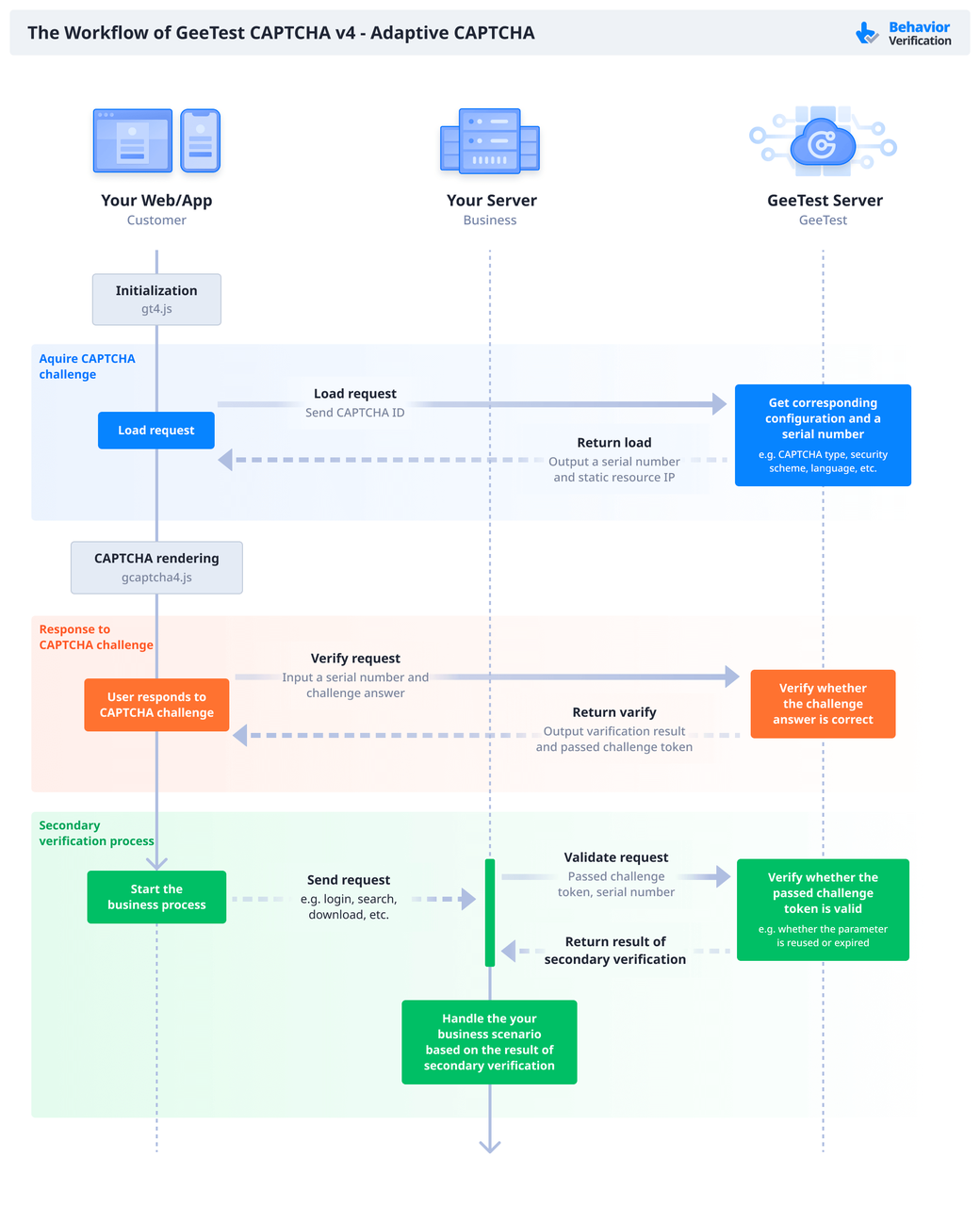
On the frontend, CAPTCHA is responsible for initiating verification and collecting validation signals.
Common tasks include:
- Loading the CAPTCHA JavaScript SDK or script asynchronously
- Initializing CAPTCHA only when a protected action is triggered
- Ensuring compatibility across browsers, devices, and network conditions
- Avoiding unnecessary visual challenges for legitimate users
CAPTCHA should activate only when required, not during every page load.
Step 4: Trigger CAPTCHA During User Actions
CAPTCHA verification should be triggered at the moment a sensitive action is performed, such as:
- Clicking a “Submit” or “Login” button
- Sending a form request
- Calling a protected API endpoint
At this stage:
- CAPTCHA evaluates user behavior or challenge responses
- A verification token or result is generated
- The token is attached to the user request
This ensures CAPTCHA decisions are context-aware.
Step 5: Implement Backend Verification Logic
Backend verification is the most critical step in CAPTCHA installation.
On the server side:
- Receive the CAPTCHA token from the frontend
- Send the token to the CAPTCHA provider’s verification API
- Validate the response and verification status
- Decide whether to allow, reject, or further inspect the request
Critical rule
CAPTCHA verification must always be performed on the backend. Frontend validation alone is never sufficient.
Step 6: Define Response and Failure Handling
After verification, the system should respond appropriately.
Typical handling includes:
- Allowing verified requests to proceed
- Blocking failed or suspicious requests
- Returning clear error messages for verification failures
- Logging failed attempts for monitoring and analysis
Graceful handling improves both security visibility and user experience.
Step 7: Monitor CAPTCHA Performance After Deployment
CAPTCHA installation does not end at deployment.
Post-installation monitoring should include:
- Verification success and failure rates
- False positive occurrences
- Impact on conversion and completion rates
- Performance under peak traffic conditions
Monitoring data helps identify:
- Misconfigured thresholds
- Emerging attack patterns
- Opportunities to optimize user experience
Step 8: Maintain and Optimize Over Time
As traffic and threats evolve, CAPTCHA configurations may need adjustment.
Ongoing activities include:
- Updating CAPTCHA SDKs or integration endpoints
- Reviewing logs and verification metrics
- Adjusting trigger conditions or verification sensitivity
- Responding to abnormal traffic or attack spikes
A well-maintained CAPTCHA system evolves alongside the website it protects.
Step 9: Enterprise-Level Configuration for GeeTest Adaptive CAPTCHA
For enterprise environments, CAPTCHA implementation often goes beyond standard frontend and backend integration.
GeeTest Adaptive CAPTCHA provides additional enterprise-level capabilities that require dedicated configuration and coordination. These configurations are optional for basic use, but essential for organizations with complex risk profiles, global users, or strict security requirements.
1. Customized Security Strategies for Business-Specific Risks
As a proven CAPTCHA technology since 2012, GeeTest Adaptive CAPTCHA offers 60+ configurable security strategies designed to address diverse and evolving attack patterns.
These strategies can be tailored to:
- Different business scenarios (login, registration, promotions, APIs)
- Varying risk levels across user journeys
- Industry-specific compliance or security requirements
Rather than applying a single static rule set, enterprises can:
- Enable scenario-based verification policies
- Adjust risk thresholds dynamically
- Define escalation paths for suspicious traffic
For organizations with complex requirements, custom strategy configuration is typically completed in collaboration with a dedicated account manager, ensuring alignment with real business risks rather than generic assumptions.
2. Flexible Deployment Options for Enterprise Infrastructure
Unlike tool-level CAPTCHA solutions, GeeTest supports multiple deployment models to accommodate enterprise infrastructure and compliance needs.

These options allow GeeTest Adaptive CAPTCHA to:
- Integrate seamlessly with existing risk control systems
- Align with internal security architecture and data governance policies
- Support high-availability and high-concurrency environments
For enterprises with strict data residency or internal system integration requirements, deployment architecture can be planned and implemented with GeeTest’s technical team.
3. Global and Multilingual Configuration for International Users
For websites serving global audiences, CAPTCHA must perform consistently across regions and languages.
GeeTest Adaptive CAPTCHA supports:
- 78 languages, ensuring localized user experiences
- 7 global service nodes, enabling low-latency verification worldwide
- Region-aware routing for improved performance and reliability
This global infrastructure helps enterprises:
- Maintain high pass rates for legitimate users across regions
- Reduce latency-related verification failures
- Provide consistent security standards worldwide
For organizations with international operations or region-specific requirements, global and multilingual configuration can be coordinated with an account manager during installation.
How to Choose the Right CAPTCHA for Your Website
When selecting a CAPTCHA solution, the goal is to protect key business actions without creating unnecessary friction for legitimate users. A well-chosen CAPTCHA should align with both current risk levels and future growth.
Key factors to consider include:
- Bot threat complexity: Consider whether your website faces basic automated traffic or more advanced attacks such as credential stuffing, scraping, or AI-driven bots. Higher-risk environments require adaptive and behavior-based CAPTCHA rather than static challenges.
- Traffic volume and stability requirements: Evaluate how the CAPTCHA performs under daily traffic as well as sudden spikes during campaigns or peak events. Stability and low latency become increasingly important as traffic grows.
- User experience impact: Assess how often real users are interrupted by visible challenges and whether low-risk interactions can pass with minimal or no friction. A smoother experience directly supports higher conversion rates.
- Flexibility and long-term scalability: Determine whether the CAPTCHA can adapt to different business scenarios, evolving attack patterns, and future requirements. Limited configurability can become a constraint as the website scales.
In many cases, websites move toward more adaptive and enterprise-ready CAPTCHA solutions as security and experience requirements increase—making the choice of CAPTCHA an important long-term decision rather than a one-time implementation.
Why Many Websites Choose GeeTest CAPTCHA?
Many enterprises move beyond basic CAPTCHA tools when they require:
- Higher resistance to advanced and AI-driven bots
- Better user experience at scale
- Flexible deployment and customization
- Dedicated technical support and long-term stability
Beyond technology, GeeTest is often chosen for its enterprise-level flexibility and support. With configurable strategies, multiple deployment options, and dedicated technical assistance, GeeTest enables businesses to treat CAPTCHA not just as a protective layer, but as a reliable, long-term solution aligned with their growth and security goals.